
Last Updated on: 2nd July 2025, 02:25 am
Changing your Valorant name is a common question for many players. Whether you want a fresh identity or just made a typo, updating your name is simple.
This guide will help you understand how to change your Valorant name, how often you can do it, and answer all related questions.
You’ll get clear instructions, tips, and important facts to make the process smooth. Let’s dive in.
What Is a Valorant Name?
In Valorant, your name is linked to your Riot ID. This ID has two parts:
- Display Name: The main name you choose, like “SharpShooter”
- Tagline: A short code after a “#” symbol, like “#EUW1”
Your full Riot ID looks like this: SharpShooter#EUW1
This ID is what your teammates and opponents see in matches. When you change your Valorant name, you are actually changing your Riot ID.
Why Change Your Valorant Name?
There are many reasons to change your Valorant name:
- You want a name that fits your current play style
- You made a mistake when first choosing your name
- Your old name feels boring or outdated
- You want to create a new gaming identity
- You want to avoid negative associations with your old name
No matter why, Riot Games lets you change your name without any hassle.
Is Changing Riot ID Free?
Yes, changing your Riot ID is completely free. Riot allows you to update your Valorant name once every 30 days without any cost.
You don’t have to pay money or use in-game currency. The only limitation is that you have to wait 30 days between changes to avoid frequent renaming.
How Do I Change My Name in Valorant?
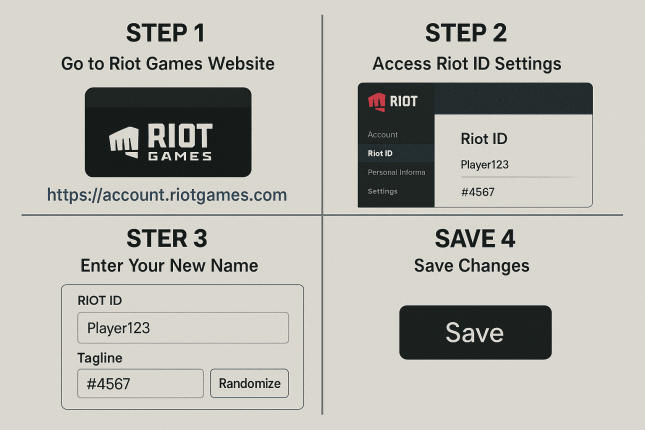
Changing your Valorant name is quick and easy. Here’s how to do it step-by-step:
Step 1: Go to Riot Games Website
Visit https://account.riotgames.com. Log in with your Riot account credentials.
Step 2: Access Riot ID Settings
Once you logged in, find the Riot ID section on your account dashboard.
Step 3: Enter Your New Name
Type your desired display name and tagline in the boxes. Your display name is your main username, and the tagline is a short code after the “#.”
If you want, click the “randomize” button to get a new tagline.
Step 4: Save Changes
Click the Save button to update your Riot ID. Your new name will apply to Valorant and other Riot games instantly.
Can I Change My Valorant Username Anytime?
You can change your Valorant name once every 30 days.
This rule prevents players from switching names too often. If you try to change it sooner, the system will show you how long you must wait.
What Happens When You Change Your Valorant Name?
Your new name will replace your old one in:
- Match lobbies
- Friends list
- Leaderboards
- Chat messages
Your in-game stats, skins, and progress remain untouched. The name change only affects your visible identity.
Can We Change Our Valorant ID?
Yes, your Riot ID is the same as your Valorant ID. Changing your Riot ID changes your Valorant name. This ID is also used in League of Legends and other Riot Games titles.
How to Pick a Good Valorant Name
Your name represents you in-game. Here are some tips for choosing a name:
- Keep it short and easy to spell
- Avoid special characters and spaces
- Make it unique and memorable
- Follow Riot’s code of conduct
- Reflect your personality or gaming style
For example, names like SharpAim#123 or SilentSniper#NA1 work well because they are clear and related to gameplay.
What Is the Tagline in Valorant?
The tagline is a short code after the “#” in your Riot ID. It helps Riot Games differentiate between players who have the same display name.
You can choose your own tagline or let Riot assign one randomly.
Can I Use Spaces or Symbols in My Valorant Name?
No. Riot ID does not allow spaces or most special characters in the display name. You can only use letters, numbers, and some simple characters.
Will My Friends Still Find Me After Changing My Name?
If your friends try to search your old Riot ID, they will not find you.
Make sure to give your friends your new Riot ID, including the tagline. For example AceGamer#EUW2
How Many GB Is Valorant?
Valorant takes up about 30 to 35 GB of storage after installation and updates.
The initial download is smaller, but with patches and new content, it grows over time.
Can I Use the Same Riot ID for All Riot Games?
Yes, your Riot ID is linked to your whole Riot account. When you change your Riot ID, it changes across all Riot games, like Valorant, League of Legends, and Teamfight Tactics.
Can I Change My Valorant Name Before 30 Days?
No, you must wait for the full 30-day cool down before changing your Riot ID again. Trying before that will show a timer with the remaining time.
How Do I Know If a Valorant Name Is Available?
When you enter a new display name and tagline, Riot checks if it is unique.
If someone else already uses the same combination, you’ll see an error. You can then try a different tagline or add numbers to the display name.
What Should I Avoid When Changing Valorant Name?
- Using offensive or banned words
- Copying popular players’ names
- Using too many numbers or symbols
- Names that are too long or confusing
Stick to clear and friendly names to avoid problems.
How Often Can I Change My Valorant Name?
You can change your name once every 30 days. There is no limit on how many times you can do this over your lifetime.
Can I Revert to My Old Valorant Name?
You can, but only if your old name and tagline are still available. There is no “undo” button, so you must manually enter the old name again.
Will My Match History Be Affected When I Change My Name?
No, changing your Valorant name does not affect your match history or stats. Your progress remains safe.
How Long Does It Take for the New Name to Show Up?
Your new Riot ID appears immediately in most places. If it doesn’t show right away, restart Valorant, and it will update.
What If I Forgot My Riot Account Details?
If you don’t remember your login, use the “Forgot Password” link on the Riot website to recover your account.
Frequently Asked Questions (FAQs)
How Do I Change My Name in Valorant?
Log in to your Riot account on the Riot Games website, go to Riot ID settings, enter your new name and tagline, and then save.
Can I Change My Valorant Name for Free?
Yes. Riot allows free name changes once every 30 days.
Can We Change Our Valorant ID Anytime?
No, you must wait 30 days between changes.
How Many GB Is Valorant?
Valorant requires around 30 to 35 GB of storage after installation.
Will Changing My Name Affect My Skins or Rank?
No. Your name change does not affect skins, rank, or match history.
Changing your Valorant name is simple. Take your time to pick a good one. Share your new Riot ID with friends, and keep enjoying the game.
If you want, bookmark this guide for the next time you need a fresh start in Valorant.
Final Thoughts
Changing your Valorant name is easy, free, and safe. It takes just a few minutes and helps you refresh your gaming identity.
Remember, you can do this once every 30 days. Make your new name count and show your best self in Valorant.

The Cool Names is regularly providing the name and nickname ideas for games, social media, pets and people. A group of highly qualified and experienced writers finds the perfect names and give tips and ideas about name ideas and related topics here at this blog. Follow us for unique name and nickname ideas on a daily basis.